
A guide to Thok
Keyboard sounds for Mac.
Want a mechanical keyboard sound while you type on your MacBook? Thok adds warm Deep Thock audio to supported key presses, with simple controls in your menu bar.
Start with the sound, then check whether your Mac and keyboard are a good fit.
Hear the preview01 / Listen first
Is this your kind of thock?
Sound is personal. Listen to this six-second Deep Thock montage before deciding whether you want it alongside your everyday typing.
Assembled sound preview; not a live app recording.
A sound app adds audio feedback. It does not change the physical feel of your keyboard or make its existing key noise quieter.
02 / Check your Mac
What to check before you choose.
- Your Mac
- The listed requirements are macOS 14 or later and an Apple M1 chip or later. Intel Macs fall outside those requirements.
- Your keyboard
- Approximate spatial positioning is calibrated for the built-in MacBook ANSI keyboard. External keyboards are not calibrated.
- Your preferences
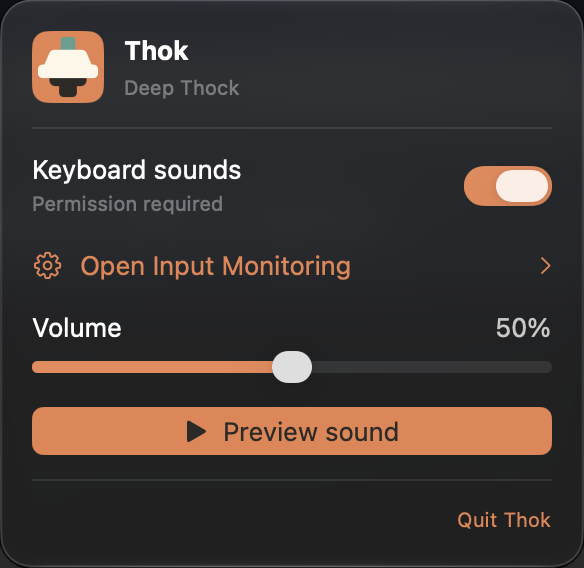
- Thok offers Deep Thock, an on/off control, a volume slider and Preview sound.
Check the Mac App Store listing for current regional pricing and requirements.
03 / Know the setup
Why keyboard sounds need Input Monitoring.
Input Monitoring lets Thok respond to key presses while you use other apps. You can use Preview sound before granting keyboard access. Sounds triggered by typing require that permission.
- Open Thok’s menu-bar panel and try Preview sound.
- Use Open Input Monitoring to reach the macOS permission settings and enable Thok.
- Return to Thok, turn Keyboard sounds on and adjust the volume. Your Mac’s output volume and mute still apply.
Thok uses physical key codes rather than typed characters, does not save key events, and has no accounts, analytics, tracking or network access. Read the privacy details.
A few practical questions.
What if I cannot hear anything?
Check Thok’s on/off control and volume, then your Mac’s output volume and mute. Try Preview sound to check audio, and check Input Monitoring for typing sounds. See setup and troubleshooting help.
Can I try the sound before buying?
Like the sound? Check Thok on the Mac App Store.
For macOS 14 or later on Apple M1 or later. Typing sounds need Input Monitoring.